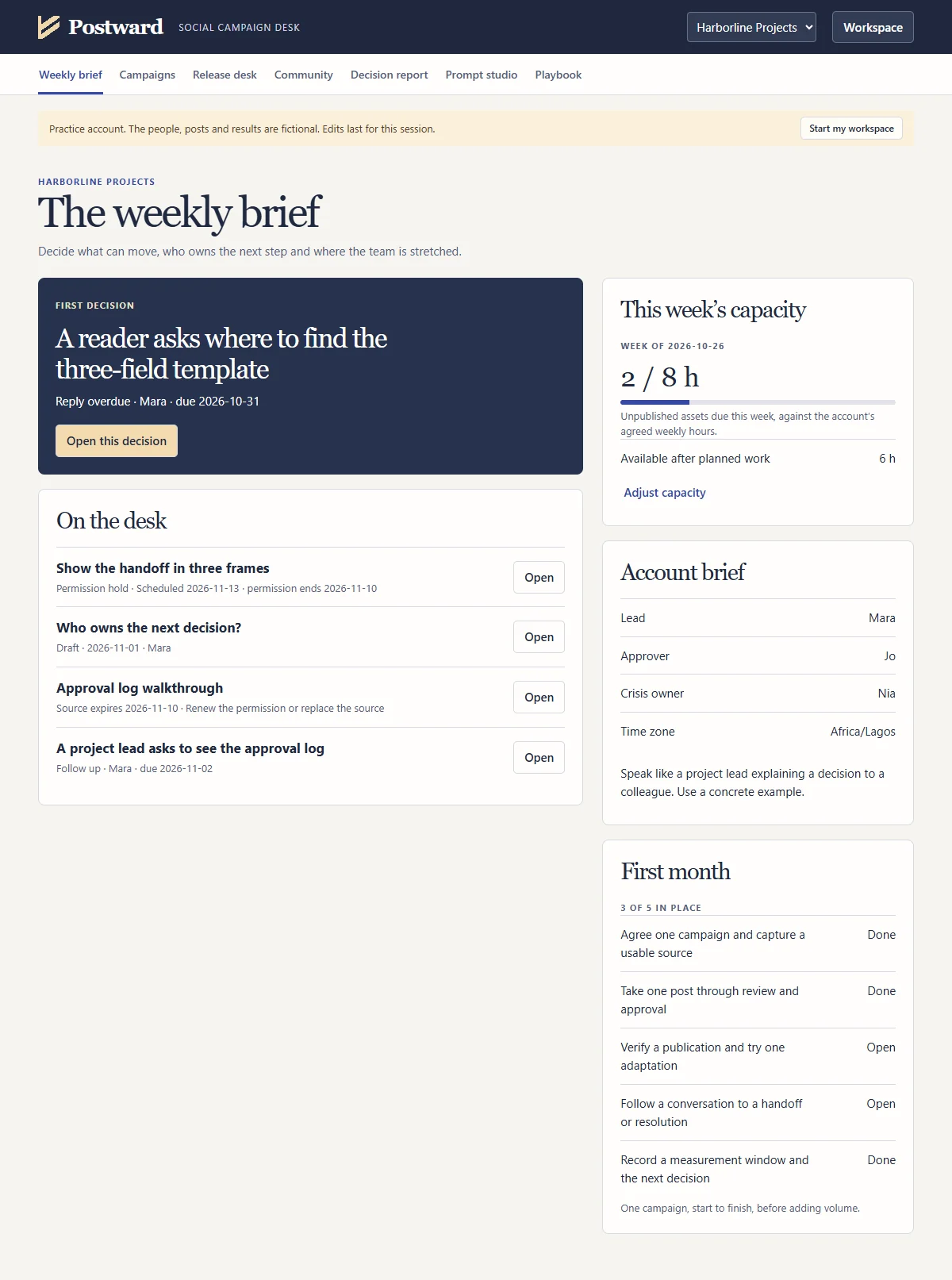
The week, in order
The weekly brief puts the decision due now at the top and checks the planned work against your hours.
For social media managers who answer to a client or a boss
Postward runs your client social work from the first customer question to the monthly report. Plan from real evidence, get the exact version approved, prove what went live, see what every post achieved and get AI help that keeps client material under control.
One file. No account. No subscription. Pay once and keep it.
Changes from version 1
AtBefore handoff,anyone leaves the project, ask one question. If the next decision changes tomorrow, who has the authority to confirm it? Write their name beside the decision.
Taken from the practice account that comes with Postward.
The problem
A client asks what they signed off, why a post went out, or what last month’s numbers actually mean. You know the answer is somewhere.
So you spend an afternoon rebuilding the trail and hope you found all of it. When something goes wrong, that afternoon happens in front of the client.
Postward keeps the record while you work. The next time someone asks, you open the post and show them.
See it working
One fictional client, Harborline Projects, taken through an approval, a revision, a permission date, a results import, the Prompt studio and the playbook. Every screen is the real app.
1 minute 56 seconds · silent · 3.4 MB, nothing loads until you press play · Read the full walkthrough
The weekly brief puts the decision due now at the top and checks the planned work against your hours.
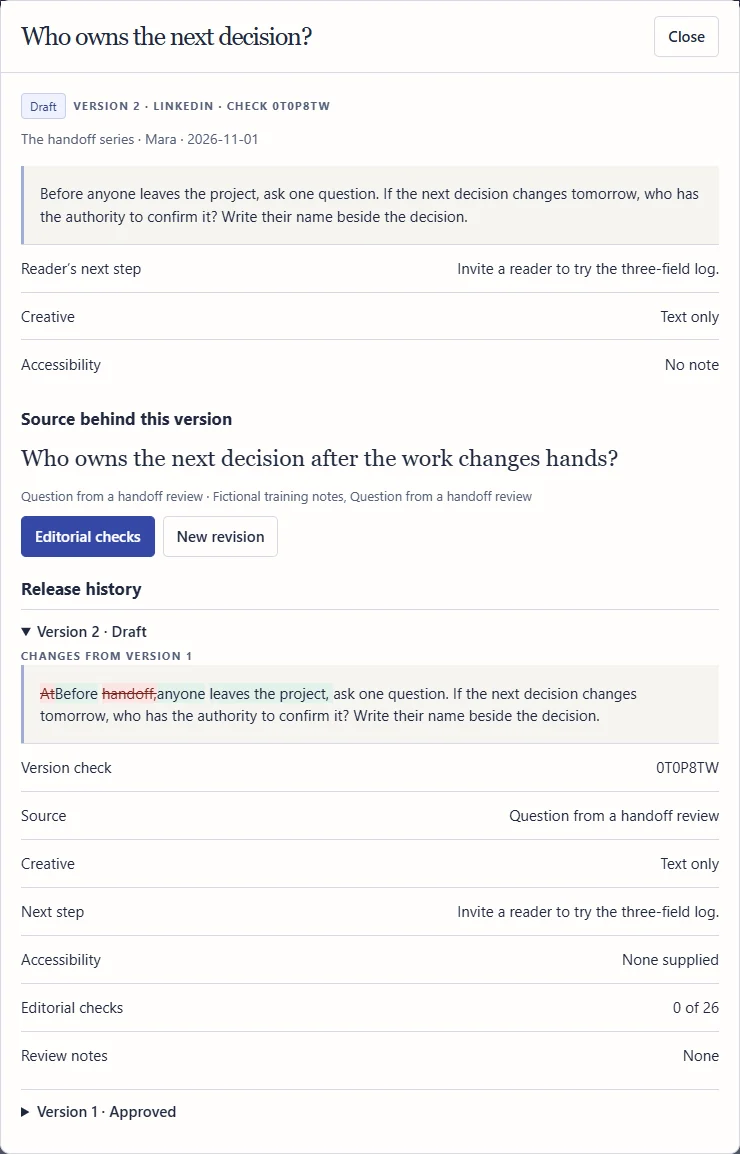
Edit an approved post and it returns to Draft, with the changed words marked against what the client approved.
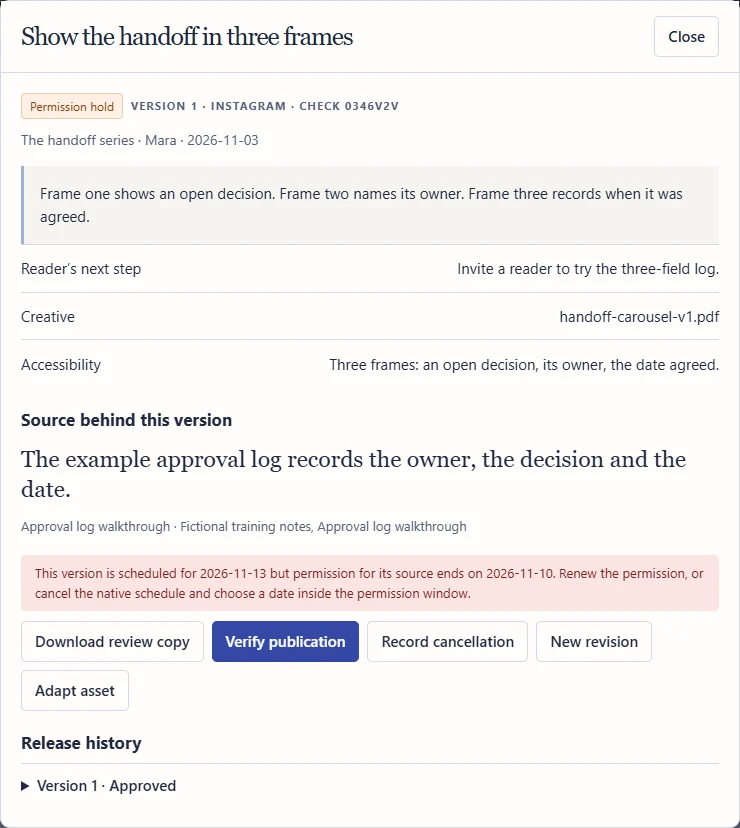
Schedule a post past the date its source can be used and Postward holds it, naming both dates.
More than a record
The record protects you. These three parts help you decide what to make next, make it faster and run the whole operation with a method you can explain to any client.
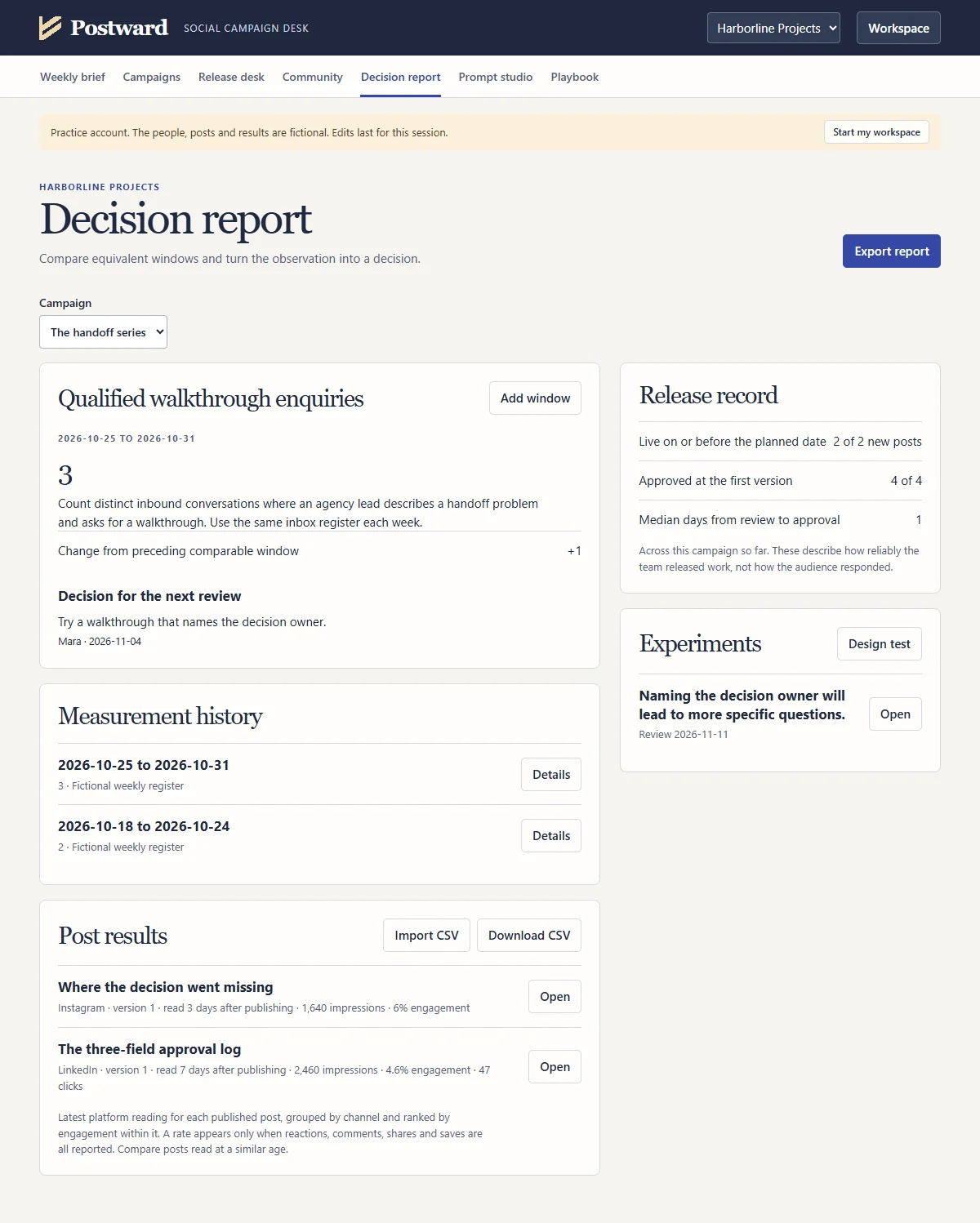
Post results and CSV import
Record impressions, reach, reactions, comments, shares, saves, clicks and views for each published post, or import the CSV export from any platform. Postward previews the rows it matched to a post by live address, flags any row it cannot place with certainty, and ranks posts by engagement within each channel.
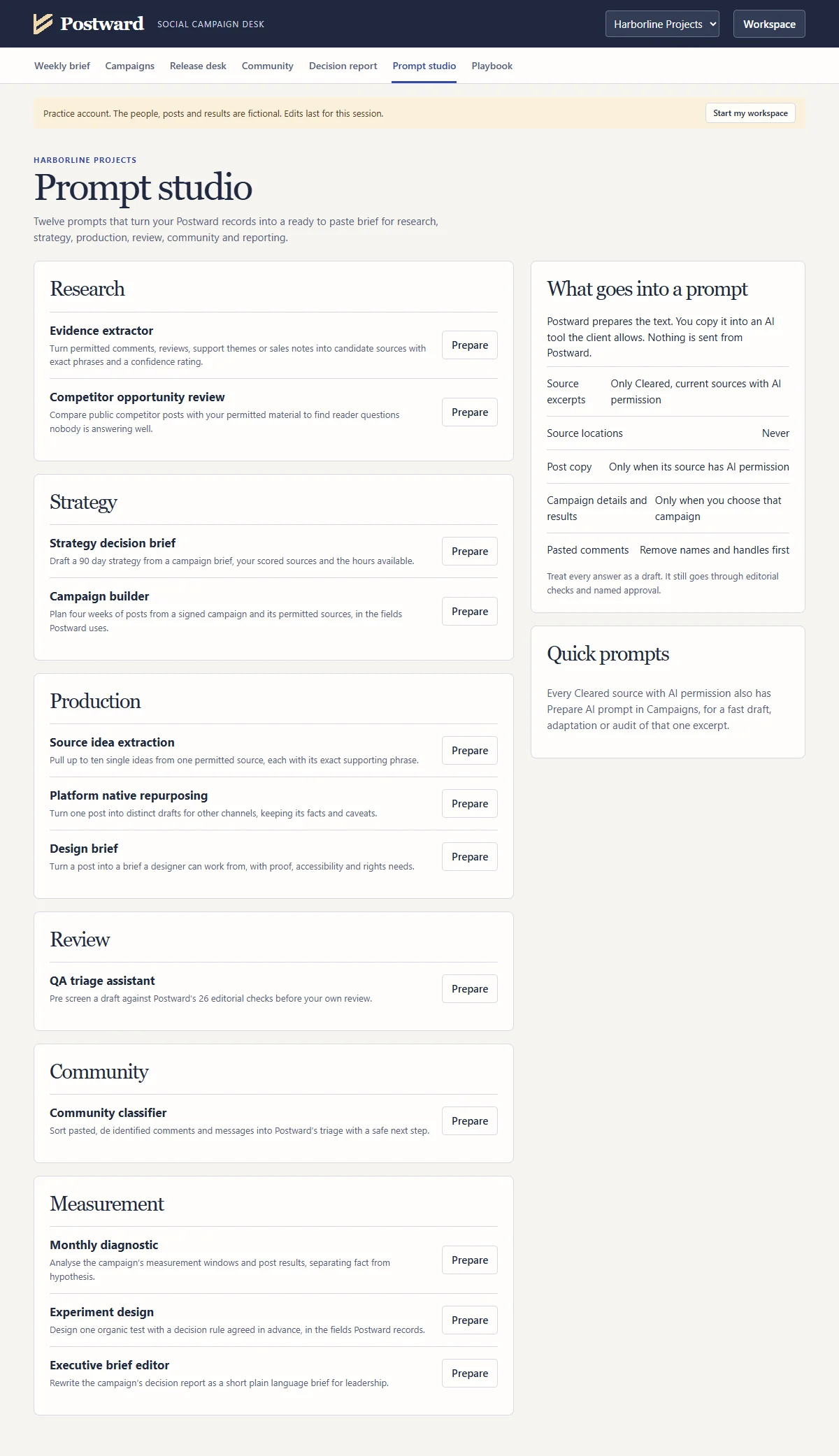
The Prompt studio
Choose a job and Postward writes the prompt for you, filled with the right campaign, sources, posts or results. Paste it into ChatGPT, Claude, Gemini or whichever tool your client allows. A strategy brief, a four week campaign plan, ten ideas from one source, drafts for every channel, a design brief, a first pass against all 26 editorial checks, comment triage, a monthly diagnostic, an experiment plan and an executive summary.
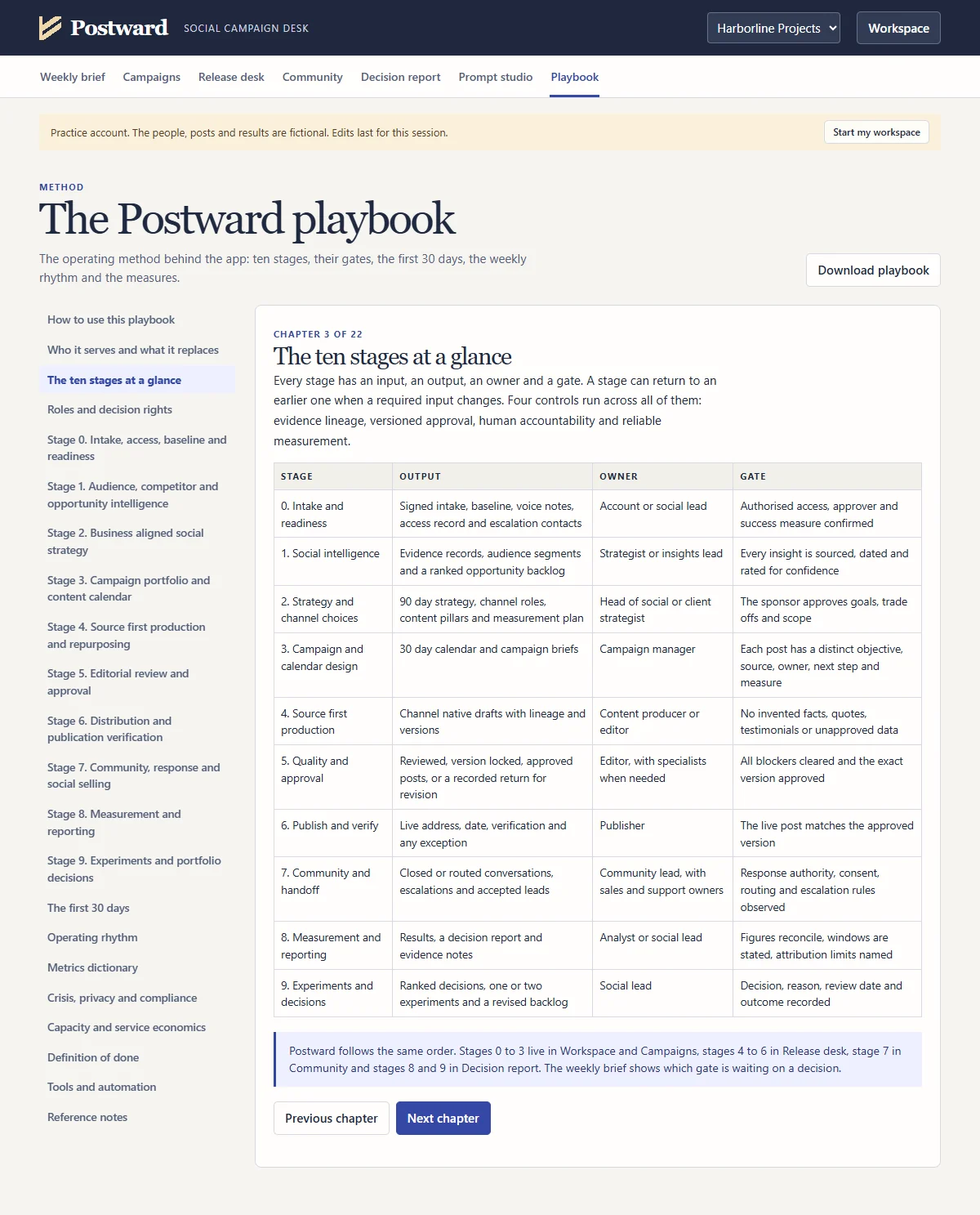
The playbook
22 chapters and over 5,000 words: roles and decision rights, ten stages with the gate that closes each one, the first 30 days, a daily, weekly, monthly and quarterly rhythm, a metrics dictionary, crisis and privacy rules, capacity planning and a definition of done. Every stage points to the screen and the prompt that support it.
When the client asks
| The question | Today | With Postward |
|---|---|---|
| “Who approved this?” | Scroll back through chats and email. | Open the post. The approver’s name, the date and the evidence sit against that exact version. |
| “Is this what I signed off?” | Compare screenshots and argue about wording. | The check code either matches the one they approved or it does not. Changed words are marked. |
| “Did it go out as approved?” | Assume it did. | Someone checked the live post and recorded its address and the date it went live. |
| “Can we still use that quote?” | Hope somebody remembers the expiry. | You were warned two weeks ahead, and any post scheduled past the date is on hold. |
| “Which posts actually worked?” | Export from each platform and line the numbers up by hand. | Import the CSV. Posts ranked by engagement within each channel, each reading dated. |
| “What did we learn this month?” | A spreadsheet and a guess. | A decision report comparing like with like, ending in one decision, an owner and a date. |
What makes it different
You do the work you already do. Postward records it in a way you can stand behind.
Every post carries a seven character check code that changes whenever the wording or creative changes. The approver quotes the code back, so both sides know they saw the same post. Any edit after approval sends it back to Draft on its own.
Each revision is kept with its approval, and changed words are marked against the version before. When someone says “that is not what I approved”, you open the history and show them.
A post only counts as Published when someone checks the live post and records its address and the actual date. When a later version goes live you record whether it updates the existing post or is a separate post with its own address, and reports count updates separately.
Every post is tied to its source. Record when a fact or permission expires and Postward warns you two weeks ahead, holds the posts that rely on it, and puts a schedule that runs past it on permission hold until you renew the permission or move the date on the platform. Renewals need a name and a reference, and the history is kept.
Incidents first, then overdue replies, briefs to sign, posts awaiting approval, schedules nobody confirmed, expiring sources and follow ups. It also shows whether the week’s planned work fits the hours you have.
Mark a conversation Critical and release actions pause across that client account until the named incident owner resolves it. Clients usually ask for this safeguard after something has gone wrong. You can show them it already exists.
A review copy for the approver, an approved copy pack for the publisher, a campaign calendar for the team and a plain language decision report for the client. Each person gets only what they need.
The decision report compares only like for like periods and shows Unknown instead of a misleading figure. Its release record shows posts live on time, approvals at the first version and the median wait for approval.
Twelve studio prompts plus a quick prompt on every source. Only passages with separate AI permission go in, never their location. Campaign details go in only when you choose a campaign, and Postward never sends anything anywhere.
One HTML file. No account, no subscription, no server and no install. Client records stay in your browser on your computer, with dated backups you control.
Who it is for
Inside the app
A prioritised decision queue, the first decision, weekly capacity against planned hours, an account brief, a first month checklist and the date of your last backup.
Briefs with audience, objective, channels, dates, scope and one measure, fixed by a named sign off. A source library with permission status, Use until dates, renewal history, AI permission and zero to five opportunity scoring.
Board and month calendar views. Twenty six editorial checks in five groups, review copies with check codes, named approval, word level revisions, adaptations linked to their parent, schedule records, permission holds and live verification.
One case per conversation with Routine, Business, Critical and Spam triage, owners, due dates, accepted handoffs and incident resolution by the named owner. Overdue replies rise to the weekly brief.
Dated measurement windows for counts or rates, like for like comparison, one decision with an owner and a follow up date, post results ranked by engagement with CSV import and export, the release record, experiments with a stopping rule, and an exportable report.
Twelve prompts for research, strategy, production, review, community and measurement, each assembled from your records under the same permission rules.
The operating method in 22 chapters, with a note on every stage naming the screen and prompt that support it, and a downloadable copy.
Separate client accounts, a practice account, dated backups, import with a preview, a pre restore copy, protection against two tabs overwriting each other and validation of every saved record.
Your first ten minutes
Postward opens on a fictional practice account. Follow these steps and you will have seen the whole idea.
Price
No subscription and no per client fee. Run every client account you manage from the same copy, with the results tracking, the twelve prompts and the playbook included.
Think about the last time you rebuilt an approval trail for a client, or the post that went out with wording nobody approved. Postward exists so that afternoon does not happen again.
Start in the practice account the day you buy, and move your first real client in when you are ready.
$99one payment
Instant download. Works offline in desktop Chrome.
Prices in US dollars. Sales tax or VAT may apply where you are.
Questions
No, and that is deliberate. Postward never asks for your social logins. You publish where you always do, then record what went live, so the record stays independent of any platform.
Each prompt is a ready made brief for a specific job, such as planning four weeks of posts, pulling ten ideas from a source, drafting a post for other channels or analysing a month of results. Postward fills it with the right records from your workspace, you copy it into the AI tool your client allows, and you review the answer like any other draft. Postward itself never connects to an AI service.
No direct connection. Export post results from each platform as a CSV and import it. Postward previews the rows it matched to your posts by live address and skips any it cannot place with certainty. You can also type the figures in, or fill in the template Postward gives you.
No. It is one file you keep. Pay once, download once.
In your browser, on your computer. Nothing is uploaded anywhere and the app makes no network requests. Download a dated backup each week in case you clear your browser or change computer.
Yes. Each client is a separate account with its own campaigns, sources, posts, conversations and reports.
No. You send them the review copy, the approved copy pack or the decision report. They do not need the app.
Postward is built for one operator per browser. Share decisions through the downloads and keep one person responsible for the record.
Start in the practice account. The illustrated guide walks through every screen, starting with a ten minute tour.
A zip with four files: the app with its Prompt studio and playbook, Start here, the illustrated guide and the campaign field guide. Extract it, open Postward.html in desktop Chrome and you are in.
It has been tested in desktop Chrome on Windows, including a phone width layout. Use desktop Chrome. Safari and Firefox have not been tested yet.
Every approval tied to an exact version. Every post checked live and measured. Every permission dated. Every week put in order. And twelve prompts and a full playbook to make the next month better.
Postward · Slipper Digital